
Free K850i Themes

Any regulars to this site will know that...

  1. I have recently got a Sony Ericsson K850i!
  2. I REALLY like free things!

So logically I want to customize mine to make it a little different from everyone else's K850i... Bring on Themes4UrMobilePhone.com!

[adsense:468x60:4496506397]

You might also know that I've posted about the site I'm going to recommend before (for my friends N73 and N95)... I cant help it - its bloody brilliant!

So if you want any Free Sony Ericsson K850i Themes - then get over to T4M right now! Here are some example images:

[adsense:160x600:6965419571]
Free Sony Ericsson K850i Theme 1 Free Sony Ericsson K850i Theme 2 Free Sony Ericsson K850i Theme 3 Free Sony Ericsson K850i Theme 4 Free Sony Ericsson K850i Theme 5

On the left are some of my favourites. There are plenty of others there and thousands for other brands of phone too!
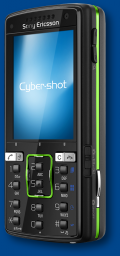
Sony Ericsson K850i

Comment Icon

4 Comments

The most recent comment was on Wed, 13th Oct 2010 - 07:48

I’ve a Sony Ericsson, K850i.
Why is it that when a photo that I’ve snapped is viewed in landscape mode I seem to notice a cascading layer that covers the photo and makes it slightly blur, however once I zoom in it becomes clear.
Appreciate feedback soon coz the phone is a newly purchased one.
Thanking you in advance.
Kenneth

this is not an error my friend this is simply th phone re-setting its pixel rate automatically so th picture still looks good quality

i like it

Add new comment

Filtered HTML

  • Allowed HTML tags: <a> <em> <strong> <cite> <code> <pre> <ul> <ol> <li> <dl> <dt> <dd> <img> <p>
  • You can use BBCode tags in the text. URLs will automatically be converted to links.
  • You can enable syntax highlighting of source code with the following tags: <code>, <pre>, <bash>, <css>, <html>, <js>, <jquery>, <mysql>, <php>. PHP source code can also be enclosed in <?php ... ?> or <% ... %>.

Plain text

  • No HTML tags allowed.
  • Web page addresses and e-mail addresses turn into links automatically.
  • Lines and paragraphs break automatically.
Type the characters you see in this picture. (verify using audio)
Type the characters you see in the picture above; if you can't read them, submit the form and a new image will be generated. Not case sensitive.