
My First Drupal Theme

I have just finished commiting my very first theme to the drupal community! I'm not a designer by nature - I prefer to be deep in the code. Thats why I commited this theme - it contains very little design (in terms of Photoshop work). This design is, pretty much, image free! On top of that - its SEO friendly too!
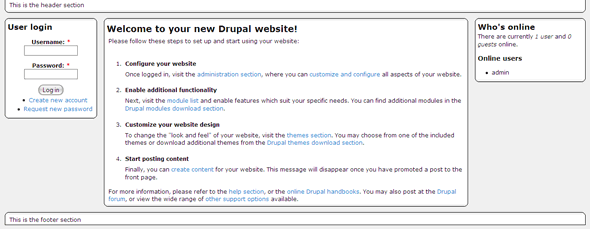
Abessive Screenshot

I say 'Pretty much' because it is still using 3 core image files for the bullet points. But what I'm pleased about is the curved CSS-only corners with a slight gradient on them AND the fact that if you remove content from a column, the content fills out over it automatically.

This theme is compatible with all (known/common/tested) browsers except IE6. It mostly works in IE6 except the footer top border goes full width rather than insetted and, randomly, the left column jumps around!

The theme is completely XHTML 1.0 Strict compliant and validates with the W3 Validator.

The theme comes in a floating width version - I might work on a fixed with... Not sure yet.

In terms of SEO (mentioned earlier) it is quite friendly as, apart from the header coming first, the content section comes first the HTML and the menu's come later on.

Any thoughts? You can find the theme's project page on Drupal.org under Abessive.

Comment Icon

9 Comments

The most recent comment was on Sat, 9th Aug 2008 - 01:00

Congrats! it looks awful XD

Just joking, keep trying!

Can you elaborate on the SEO part? what specific things did you do to make this theme SEO friendly?

Thanks

Usually with a 3 column layout the actual markup goes left, middle, right. In fact I have seen SOME themes that put the left and right column on the right of the page next to each other and the content on the left!

This theme, however, orders it (in the mark-up) as middle, left, right but DISPLAYS it as left, middle, right. This means that the actual CONTENT of the page appears first in the mark-up rather than the left menu.

Obviously there are more important SEO aspects such as the Page Title, inbound keyword linking and - lest we forget - the content itself! But this can definately help!

Nick's picture

I definately plan to port it to D6... Of course this also has to slot in with all my other plans which would be SO much easier if days were 48 hours long or I could be paid to not go to work...

I have 5 bold tag classes which specify a horizontal margin and left/right border.

Using combinations (eg, 54321 for the top and 12345 for the bottom) you end up with a curve. You could use the same technique to have as many as you want to make the curves bigger.

Add new comment

Filtered HTML

  • Allowed HTML tags: <a> <em> <strong> <cite> <code> <pre> <ul> <ol> <li> <dl> <dt> <dd> <img> <p>
  • You can use BBCode tags in the text. URLs will automatically be converted to links.
  • You can enable syntax highlighting of source code with the following tags: <code>, <pre>, <bash>, <css>, <html>, <js>, <jquery>, <mysql>, <php>. PHP source code can also be enclosed in <?php ... ?> or <% ... %>.

Plain text

  • No HTML tags allowed.
  • Web page addresses and e-mail addresses turn into links automatically.
  • Lines and paragraphs break automatically.
Type the characters you see in this picture. (verify using audio)
Type the characters you see in the picture above; if you can't read them, submit the form and a new image will be generated. Not case sensitive.